 Cropped
Blog
Buy Cropped
Cropped
Blog
Buy Cropped
Blog /
This week in Cropped: October 17 to 22
This week Cropped learned to edit a talking video for you. Jump Cuts finds the pauses, the ums and the takes you started over, and cuts them out. Then captions became an editor: pick a few lines of what you said and cut them from the video, or bring them back. Everything still runs on your own computer, and nothing is uploaded.
It is also the last week of Early Access pricing. Buy Cropped by Friday, October 23 at 11:59 pm PT and every Pro tool, today's and tomorrow's, is yours for life at no extra cost. More on that below.
$14.99 with code EARLY10, every Pro tool included for life. Early Access ends Friday, October 23 at 11:59 pm PT.
Buy CroppedCropped 0.3.42 is out now. If you already have Cropped, it updates itself. If not, the 14-day trial needs no signup or card.
#Jump Cuts: the boring parts, gone
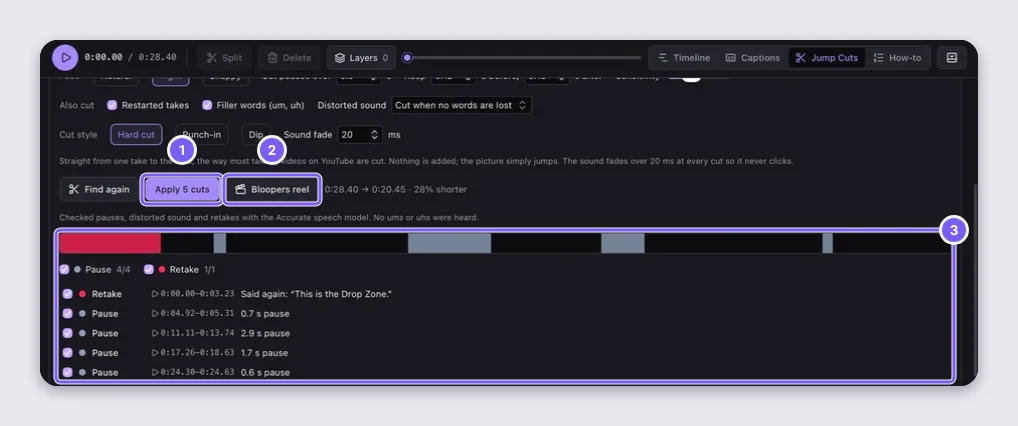
Record yourself talking, open the recording in the Studio and click Find cuts. Cropped listens to the whole thing and marks every long pause, every um and uh, every sentence you started again, and any distorted sound. Pick a pace (Natural, Tight or Snappy for Shorts and Reels) and a cut style: a straight cut, a punch-in that zooms a little on every other take, or a quick dip. You see the length before and after before you apply anything.
Nothing is thrown away. Every cut is an ordinary clip on the timeline, so you can drag one back if you liked that pause after all.
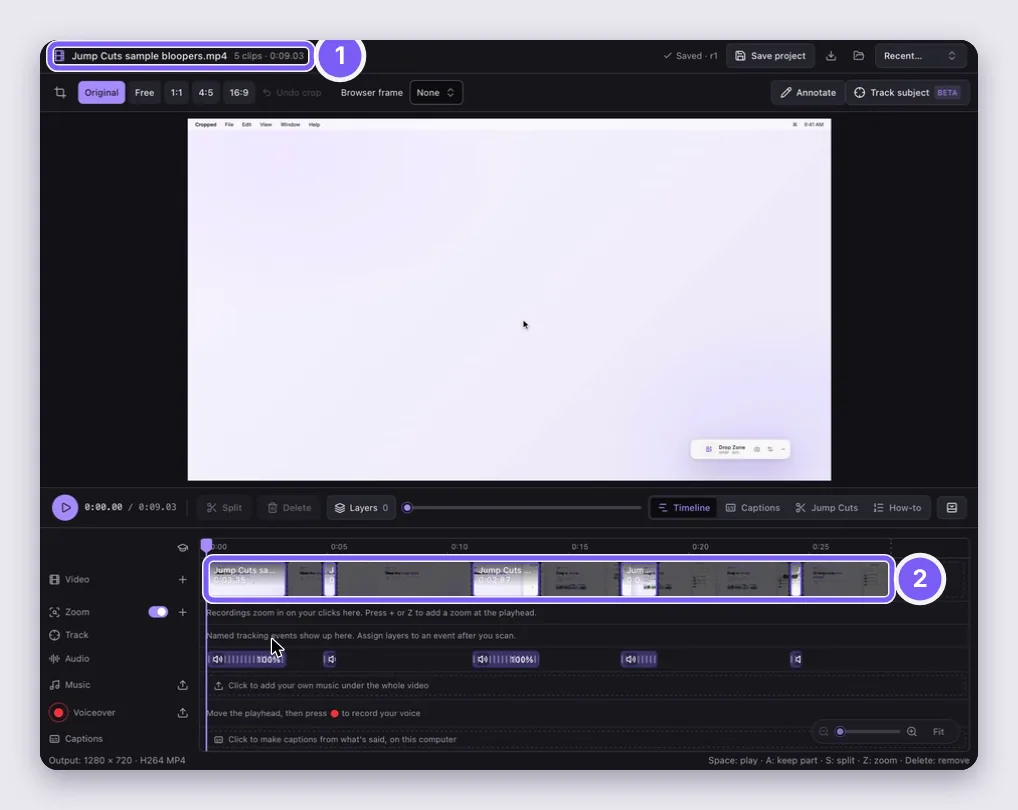
And just for fun, Bloopers reel opens a new project with only the parts that got cut, back to back in the order they happened. Your edit stays exactly as it was.
#Edit the video from its words
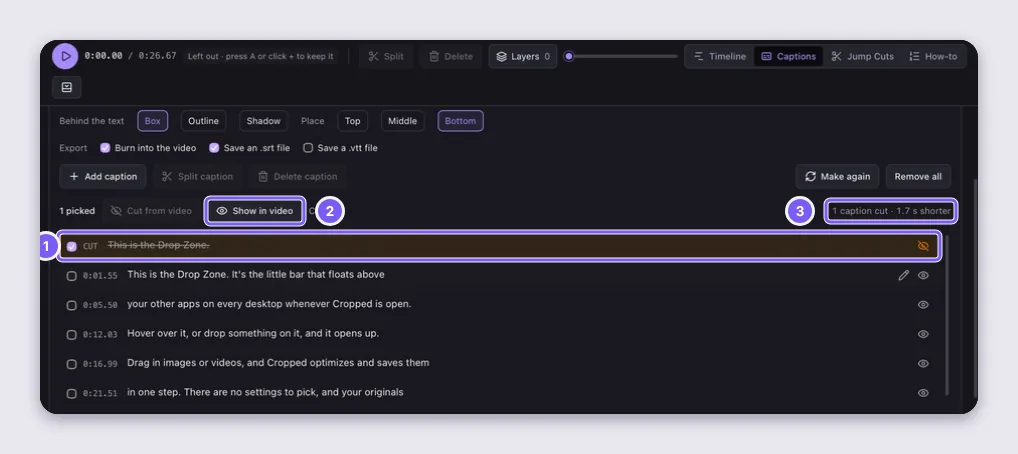
Open Captions and your video is now a list of what you said. Click a line, shift-click a range or tick a few boxes, then Cut from video and that part of the video is gone. Cut lines stay in the list, struck through, so Show in video puts them back any time.
Fix a word right in the list, too: double-click a caption, type, and press Enter to save or Esc to cancel.
#A Mac app that installs like a Mac app
Open the download, drag Cropped to Applications, and you're done. If you open it from Downloads instead, Cropped offers once to move itself for you. Video Tools and the captions engine now come inside the Mac app, so video editing, Jump Cuts and captions work the moment you install, with nothing extra to download.
#Lost your key? Ask from the app
Lost your key? Email it to me in the license panel sends your purchase key to the address you bought with, the same as the recovery page on the website.
#Early Access pricing ends Friday
Cropped is a one-time purchase today: $24.99, or $14.99 with code EARLY10 until the end of Friday. Everyone who buys during Early Access, by Friday, October 23 at 11:59 pm PT, gets Cropped Platinum: Full Feature Access:
- Everything in Cropped, yours for life, on up to 5 computers, with every update.
- Every Pro tool included for life, at no extra cost. That covers Jump Cuts, captions, the advanced video editor, the guide builder, website capture, background removal, AI fill and subject tracking, and the AI tools for Claude, Cursor and Codex, plus every Pro tool we add later.
After Friday, Cropped splits into two plans. Cropped Core stays a one-time purchase: capture, recording, cropping, optimizing, the Drop Zone, Frames and Guides, and every Core update for life. Cropped Pro becomes an optional add-on subscription for the power tools above, added from the app whenever you want them. Nothing in Core moves to Pro, and Core works the same with or without it.
If you already bought Cropped, you have Cropped Platinum. Every Pro tool is already included with your license for life, and there's nothing to do.
Early Access ends Friday at 11:59 pm PT. $14.99 with code EARLY10, and Cropped Platinum is yours for life.
Buy Cropped now