 Cropped
Help
Cropped
Help
Help / How to
Compress images for a website with WebP and AVIF
The short answer: drop your images on Cropped's Studio, pick the Web preset (WebP at 85%, up to 1920 px wide) or Web · AVIF for the smallest files, and press Optimize. Cropped never saves a file bigger than the original.
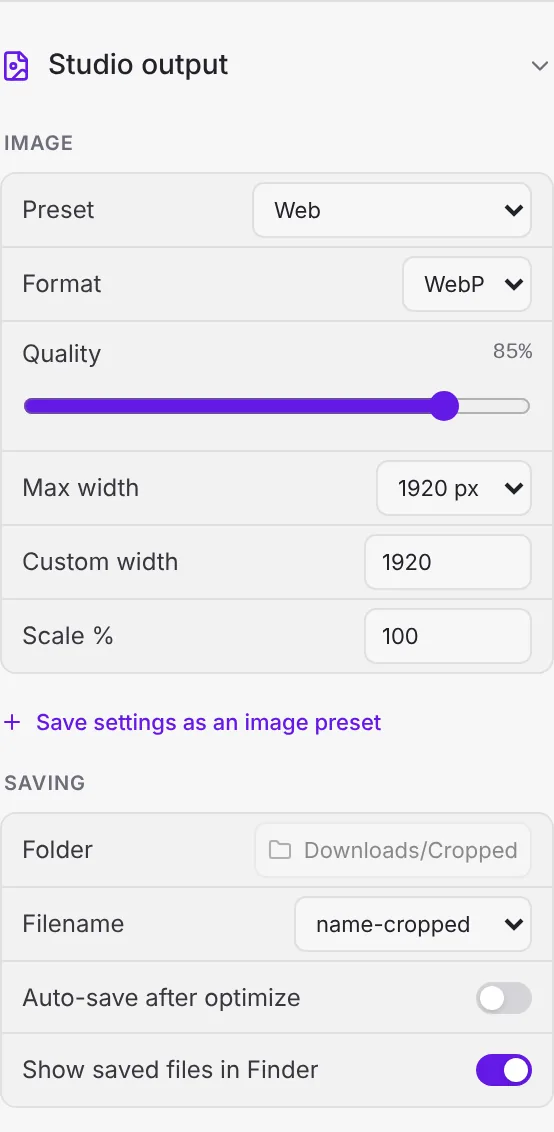
Steps
- Drop images or a whole folder on the Studio, or press ⌘ Command + O (Windows and Linux: Ctrl + O).
- Under Studio output › Image, choose a Preset:
- Web: WebP, 85%, up to 1920 px. A good default for pages and blogs.
- Web · AVIF: AVIF, 65%, up to 1920 px. The smallest files for modern browsers.
- Web · compact or Thumbnail · WebP for small embeds and product grids.
- Set Max width to the widest your layout shows, or a Max file size if your CMS has a limit.
- Compare before and after with the real file sizes, then press Optimize (⌘ Command + ↩ Return, Windows and Linux Ctrl + Enter).
Faster for a pile of images
Set the Drop Zone's image preset to Web and drop files on it. They come back compressed in Downloads/Cropped, with Undo if you change your mind. See The Drop Zone.
More options: Optimize and compress images.
Still stuck? Click the ? button at the bottom left of the Cropped Studio to ask, send us a message, or request a feature.