 Cropped
Help
Cropped
Help
Help / Crop, optimize & export
Video formats, presets and GIFs
Cropped can make a video small enough to email, a high-quality file for YouTube, or a looping GIF. Start from a preset and change anything you like.
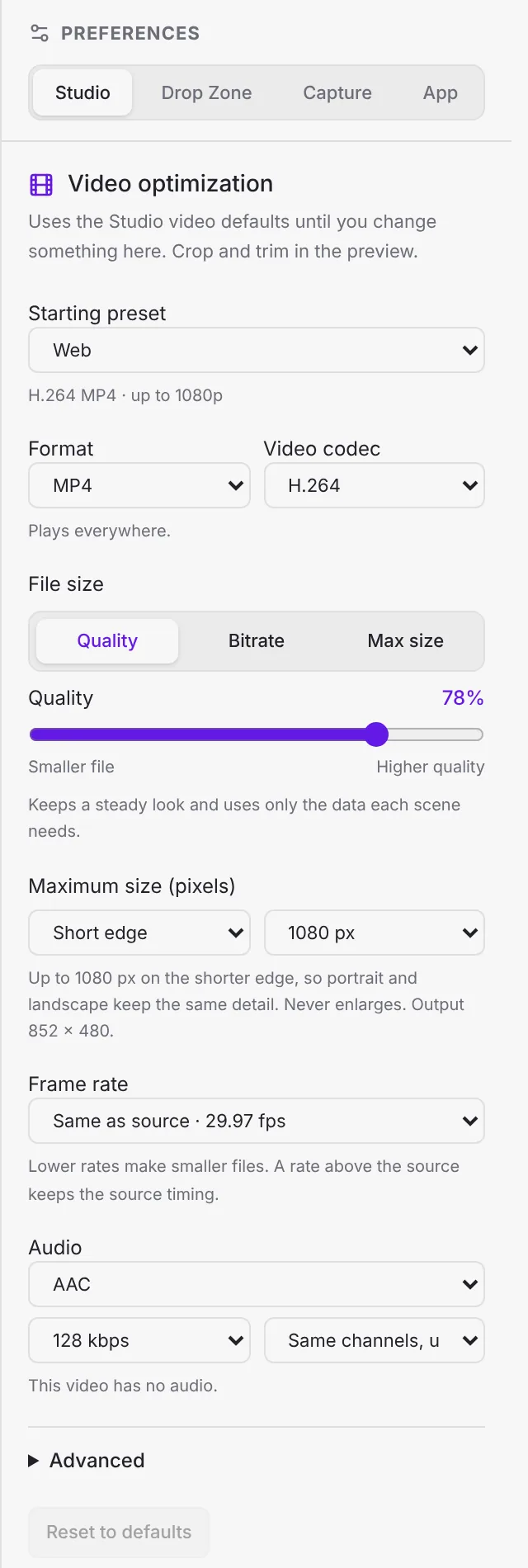
Presets
Choose a Starting preset. If you change a setting, Cropped shows "Changed from Web" and a Revert link.
| Group | Presets |
|---|---|
| Web | Web (H.264 MP4 up to 1080p, the default), Share (720p), Agent / LLM (480p, mono), Email · compact 480p (under 18 MB), Website · silent 720p, Website · WebM 1080p, WebM VP9 720p30, WebM AV1 1080p30, WebM silent loop 720p, MP4 AV1 1080p30 |
| Social | Social · 1080p / 30 fps, YouTube 1080p60, YouTube 2160p60 4K HEVC, Discord · under 10 MB, WhatsApp · under 16 MB, Email · under 25 MB 720p |
| General | Very Fast, Fast, HQ and Super HQ, each at 2160p60 4K (AV1 or HEVC), 1080p30, 720p30, 576p25 and 480p30 |
| Devices | Apple 1080p60 Surround, Apple 2160p60 4K HEVC Surround, Android 1080p30, Android 720p30, Chromecast 1080p60 Surround, Chromecast 2160p60 4K HEVC Surround |
| Matroska | MKV files with H.264, H.265, AV1 or VP9 at 1080p30 or 2160p60 4K |
| Production | MOV H.264 for editing, MOV HEVC HDR, proxy 540p, Archive (HEVC, original size, original audio) |
| GIF | GIF · small loop (320p, 10 fps, 64 colors), GIF · smooth loop (480p, 20 fps, 256 colors) |
Save settings as a new preset keeps your own mix. Your presets appear under My presets, in the Studio and in the Drop Zone. Use Update to change a saved preset, or the trash button to delete it.
Format and codec
| Format | Codecs | Use it for |
|---|---|---|
| MP4 | H.264, HEVC, AV1 | Almost everything. H.264 plays everywhere. |
| MOV (QuickTime) | H.264, HEVC | Editing in Final Cut, iMovie and Premiere |
| MKV (Matroska) | H.264, HEVC, AV1, VP9 | Archiving and media servers |
| WebM | VP9, AV1 | Websites, with Opus audio |
| Animated GIF | GIF | Short loops in docs, chats and READMEs |
- H.264 plays on every device and browser.
- HEVC (H.265) makes files about half the size at the same quality and plays on Apple devices and most new hardware.
- AV1 and VP9 are the most efficient for the web, but take longer to encode because they use the processor rather than the graphics chip.
File size
Pick how Cropped decides the file size:
- Quality (1 to 100%): keeps a steady look and uses only the data each scene needs. Best for most videos.
- Bitrate (kbps): a fixed data rate, for streaming targets.
- Max size (MB): aims for a file under a limit, such as 10 MB for Discord. Cropped shows an estimate and warns when the limit is too small for the length.
Size, frame rate and audio
| Setting | Choices |
|---|---|
| Maximum size (pixels) | Measure the Short edge, Long edge or Height, then pick Original, 2160, 1440, 1080, 720, 480, 320 or 240 px, or a custom size. Videos are never enlarged. Short edge keeps portrait and landscape videos equally sharp. |
| Frame rate | Same as source, or 10 to 60 fps. GIFs go up to 50 fps. |
| Audio | AAC (Opus for WebM), Keep original when possible, or Remove audio. Bitrate from 48 to 320 kbps. Channels: same, up to stereo; keep surround, up to 5.1; stereo; or mono. |
Advanced
| Setting | What it does |
|---|---|
| Encoder speed | Fast, Balanced or Smallest. Smallest takes longer for a smaller file. |
| Keyframe interval | How often a full frame is stored. Automatic (4 s) suits most uses. |
| Peak bitrate cap | Limits spikes, for streaming. |
| HDR | Convert to SDR (default) or Keep HDR (HEVC). |
| Pixel scale | Shrinks the video by a percentage. |
| Keep creation date | Keeps the original date. Location and other details are always removed. |
GIF settings
Choosing Animated GIF sets 12.5 fps and a height of 480 to start. Then:
- Palette: One palette (smaller) or Per frame (best color).
- Colors: 64, 128 or 256.
- Dithering: Smooth, Ordered or None.
- Loop: Loop forever, Play once, or a set number of repeats.
Still stuck? Click the ? button at the bottom left of the Cropped Studio to ask, send us a message, or request a feature.