 Cropped
Help
Help / Reference
Use Cropped offline
Updated
Most of Cropped runs on your computer, so it keeps working when the internet doesn't. Capture, the Drop Zone, cropping, optimizing, editing video and saving all work offline, exactly as they do online.
See when you're offline

When Cropped can't reach the internet, a small Offline sign shows at the top of the window. If something is waiting for the connection, it counts it, for example Offline · 2 waiting. Nothing else on screen moves, and there are no error pop-ups.
Click the sign to see what's waiting.
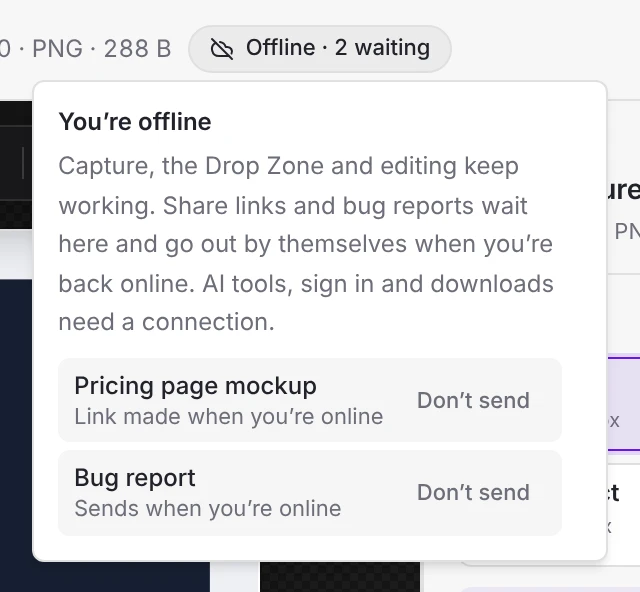
What waits for the connection
These finish by themselves as soon as you're back online, one at a time:
- Share links. Share a file from the Share sheet, the Drop Zone's Copy a share link, or the link after a capture, and Cropped keeps it ready. Once you're online it makes the link and says Your link is ready, with Copy link. It doesn't copy the link for you, because your clipboard may hold something else by then.
- Bug reports and feature requests. Send one from Settings › Bug report and it goes out once you're online, then shows under Your reports.
Changed your mind? Click the Offline sign and choose Don't send. Waiting items are kept if you quit Cropped, and go out next time you're online.
If a link still can't be made once you're online, for example because your Cropped storage is full, it shows Try again in the same list.
What needs a connection
These say right away that they need the internet, instead of waiting and then failing:
- AI tools that use your own OpenAI, Gemini, Claude or ElevenLabs key.
- Signing in, buying or restoring Pro.
- One-time downloads: extra tools, speech models for captions, the background model and the text reader. Once downloaded, they work offline.
- Checking for app updates.
Your license offline
Nobody is locked out by being offline. Cropped Core is free and always works offline. Pro and Cropped Platinum keep working for 90 days without a connection; after that, Core keeps working and Pro switches back on as soon as Cropped confirms your plan online, right when the connection comes back.
Still stuck? Click the ? button at the bottom left of the Cropped Studio to ask, send us a message, or request a feature.